
Common Github Terms for Open Source Contributors

Hello readers, it is that time of the week I drop an article in the Open source series, so let's get to it.
In the last article, I talked about the Basic Git command to know as an open-source contributor you can find the article here
This week I'll be talking about Common git terminologies to note as an open-source contributor.
Git is a tool that covered enormous terminology which can often be difficult for new users, or those who know Git basics but want to become Git pros. As an Open source contributor there some terms you should get yourself familiar with, these are common terminologies just like getting yourself acquainted with the basic git commands. So, we need a little explanation of the terminology behind the tools.
Repository
Fork
Issues
Clone
Upstream
Remote
Origin
Master
Branch
Checkout
Pull
Push
Pull Request
Review
- Merge
Let's have a look at the commonly used terms.

Repository
A repository also as a Git project encompasses the entire collection of files and folders associated with a project, along with each file’s revision history. The file history appears as snapshots in time called commits, and the commits exist as a linked-list relationship and can be organized into multiple lines of development called branches. Because Git is a Distributed Version Control System (DVCS) in the sense that every team member has a copy of the project repository i.e. copies of the project are ‘distributed’, and made available for each team member to edit and modify.
Repositories are self-contained units and anyone who owns a copy of the repository can access the entire codebase and its history. Using the command line or other ease-of-use interfaces, a git repository also allows for interaction with the history, cloning, creating branches, committing, merging, comparing changes across versions of code, and more which we will also be talking about in this article.
Simply put, A repository is a collection of files that are linked with a particular project this file includes the README file that explains the details of the project to the contributors. It is otherwise called a Repo.
Issue
The term Issue is basically the changes that need to be done in the repository. In issue labels, the issue is described and an expected or the desired result is made known to help the contributor to understand the issue more.
Fork
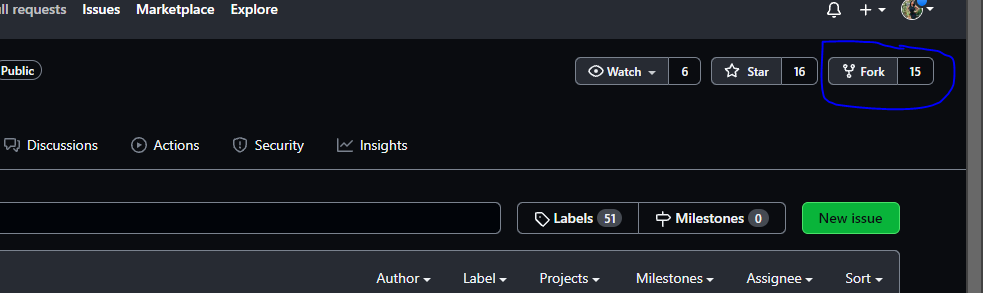
To fork, a repository is like sending a file from your PC to your phone for easy access. So you get to work on the project easily. A fork is a rough copy of a repository. Forking a repository allows you to freely test and debug with changes without affecting the original project.
Upstream
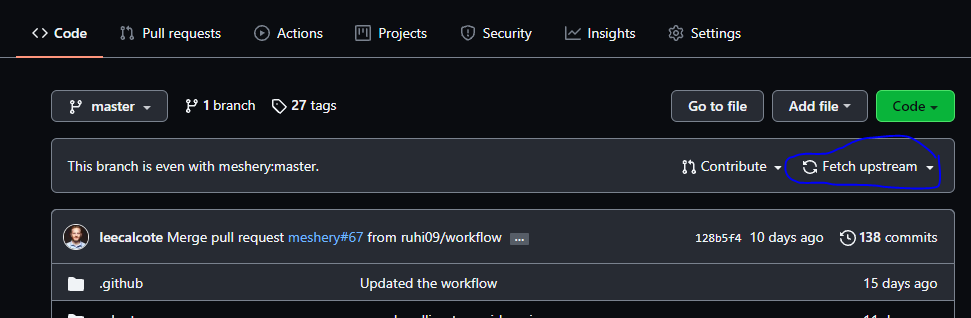
The term upstream is a reference to the repository. Generally, upstream is where you cloned the repository from (the origin) and downstream is any project that integrates your work with other works. However, these terms are not restricted to Git repositories.
As shown in the image below
Remote
The term remote is concerned with the remote repository. It is a shared repository that all contributors use to exchange their changes. A remote repository is stored on a code hosting service like Github.
In the case of a local repository, a remote typically does not provide a file tree of the project's current state, as an alternative it only consists of the .git versioning data.
Origin
In Git, origin refers to the remote repository from a project that was initially cloned. More precisely, it is used instead of that original repository URL to make referencing much easier.
Master
Master is a naming convention for the Git branch. It's a default branch of Git. After cloning a project from a remote server, the resulting local repository contains only a single local branch which is the git branch. This branch is called a "master" branch. It means that "master" is a repository's "default" branch.
Branch
A branch is a version of the repository that diverges from the main working project. It is an essential feature available in most modern version control systems.
A Git project can have more than one branch. The default branch is always Master.
Checkout
Checkout is moving from one branch to another. This command will create a new branch only in your local system and also enables you to switch to a new branch at the same time with just one command.
Pull
Pull is used to receive data from GitHub. It fetches and merges changes on the remote server to your working directory. It enables a contributor to fetch source code from the masters branch to your local working space.
Push
The term Push refers to uploading the changes made in your local repository to a remote repository. Pushing is the act of transferring commits from your local repository to a remote repository. Pushing is capable of overwriting changes, it is important you check all changes before pushing. Caution should be taken when pushing.
Pull Request
Pull requests are a process for contributors to notify the project maintainers that they have completed an issue. Once their issue branch is ready, the contributor files a pull request via their remote server account. Pull request announces to the project maintainer that they need to review the code and merge it into the master branch.
Review
Review is done by the project maintainers, it is a way of checking the changes made before merging the changes to the master branch. Reviewing changes made by contributors before merging enables the project maintainer to go through the changes made and check if it is the exact expected result and if the changes are not conflicting with the master branch.
Merge
Merging is a process to put a forked history back together for everything to become one. Immediately the changes are made, reviewed and everything works fine, the project maintainer will put everything together.
Conclusion
You will always come across these git terminologies and even more which can be found here in your journey as an open-source contributor. I hope you find the article helpful as you journey through open-source contributions.
Refrence
About the author
I am a self-taught developer with a lot community support!
Now exploring Community Management🤗🤗
Comments
Join the discussionNo comments yet. Be the first to comment.
Open-Source Series
Open-source software(OSS) enhances community development, Personal development and Collaboration. In this series, I will writing about all what beginners need to know about open-source


